Cameras & CCTV systems ↗
Compare camera kits, recorders and selected storage. Check the lens, camera count and complete configuration.
 RHODIUMSECURITY
Cameras, alarms, intercoms and security equipment supply from Rhodium Security, Lynbrook. Public and trade enquiries welcome. Browse prices or request a project quote.
CAMERAS · ALARMS · ENTRY · NETWORKING
Shop by the part of the system you need. Public buyers and trade enquiries are welcome at Rhodium Security. Displayed equipment prices include GST; send model numbers and quantities for an itemised project quote.
Compare camera kits, recorders and selected storage. Check the lens, camera count and complete configuration.
Browse alarm equipment and discuss detectors, keypads, power and communication for your installation.
Match the door station, indoor monitor, power and wiring arrangement before ordering.
Compare UniFi Access readers, hubs and entry equipment; check lock and exit requirements for the site.
Explore Ubiquiti network equipment and check switching, PoE power and connections for the proposed setup.
Find recording drives, mounting and connection accessories. Confirm the exact accessory fits your equipment.
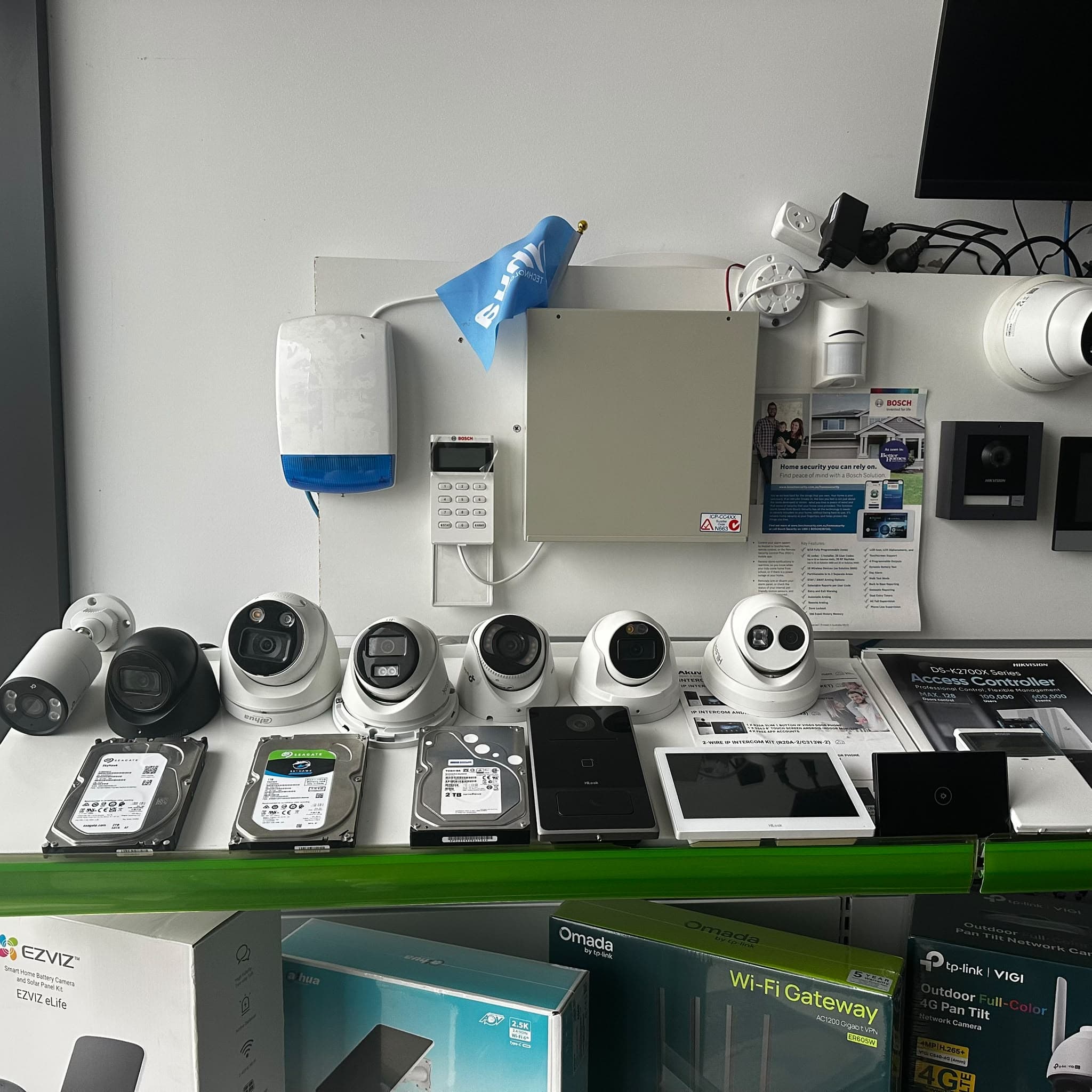
See working camera demonstrations and discuss the complete setup before choosing equipment. Bring exact model numbers, quantities and any existing recorder or network equipment that must work with your purchase.
12 Stelvio Close, Lynbrook VIC 3975
Monday–Friday 9 am–5 pm · Saturday 9 am–1 pm · Sunday closed.
Rhodium Security supplies CCTV cameras and recorders, security alarms, video intercoms, UniFi access control, networking and installation accessories from our Lynbrook showroom. Public customers, installers and project buyers are welcome. Browse the displayed GST-inclusive prices online or request an itemised quote for your selected models and quantities.
Prepare a shortlist across Dahua, Hikvision and HiLook cameras and kits, Bosch alarm equipment, video intercom ranges and Ubiquiti network or access products. Check the exact model, selected options and required parts together. Different brands and generations are not automatically interchangeable.
For Dahua project supply, send the camera, NVR, storage and accessory model numbers with quantities. Include the lens and housing choice, the existing recorder for an upgrade, and the recording or event functions you need. Visit Lynbrook for equipment advice and ask about available working demonstrations.
Ordering Hikvision cameras, an NVR or a complete kit for a Melbourne project? Send your full model list to Rhodium Security in Lynbrook. Public customers and trade enquiries are welcome. Browse current GST-inclusive prices, or request an itemised equipment quote for your quantities and selected options.
A useful equipment list records the full model and every required option. Before paying, have compatibility, quantities, availability and the complete GST-inclusive total confirmed for the actual order.
Online prices apply to the selected equipment configuration and include GST. For a quantity order, request a written quote showing models, options, quantities and any additional charges. A bulk enquiry does not automatically qualify for a discount or credit account. If you need installation too, ask for equipment and installation to be itemised in the same quote.
Visit 12 Stelvio Close, Lynbrook VIC 3975 for product advice. For an online collection order, wait for the collection-ready email before travelling. Australian standard delivery at checkout is $20 including GST per order, with estimated handling of 1–2 business days and transit of 2–7 business days, excluding public holidays. Confirm urgent model and timing requirements before paying; a catalogue listing is not a stock reservation.
Our showroom is at 12 Stelvio Close, Lynbrook VIC 3975. Open Monday–Friday 9 am–5 pm and Saturday 9 am–1 pm; Sunday closed. Bring your equipment list or property sketch to compare suitable options and ask about working camera demonstrations. Call 03 8787 8779 before travelling for a particular model or feature.
CHECK YOUR EQUIPMENT LIST
Use the bitrate and maximum power figures for your proposed cameras. These tools estimate requirements for a showroom discussion; they do not select a recorder or guarantee recording days.
For continuous recording, decimal TB = cameras × Mbps per camera × days × 0.0108. For example, 4 cameras at 4 Mbps for 14 days produce about 2.42 TB of video data.
Variable bitrate, audio, extra streams, drive formatting, recorder limits and reserved space change the result. Motion recording depends on actual activity. Megapixels alone do not establish bitrate or retention. A “No HDD” kit needs compatible recording storage before it can retain footage.
Multiply the number of identical cameras by each model’s maximum rated PoE demand. For mixed models, calculate each group and add the totals. Six cameras rated at 8 W each need up to 48 W before a reserve.
Check the correct PoE standard, each port’s limit and the recorder or switch’s total budget. IR, white lights, heaters or PTZ movement may change maximum demand. This arithmetic does not confirm electrical compatibility; allow a suitable reserve and verify the exact datasheets.
Bring the result and full model numbers to our Lynbrook showroom, or include them in your equipment enquiry. Call ahead for a particular demonstration.
A matching brand name or camera resolution is not a complete compatibility check. Bring a photo of the recorder model label, the proposed camera’s full suffix and your required functions. Keep passwords and QR access codes out of enquiry photos.
| Existing connection | What needs checking | Bring to the showroom |
|---|---|---|
| Coaxial cable and DVR | Signal format, supported resolution and frame rate, power supply and cable condition. An IP camera is not a direct coax replacement. | Recorder model and connector photos taken safely at ground level. |
| Ethernet and NVR | Available channels, incoming bandwidth, supported encoding and resolution, PoE limits and the specific event/audio functions. | Recorder and camera models, current channel count and required features. |
| Wi-Fi or battery camera | Power, local or cloud recording, account/app requirements and documented recorder support. | The exact camera model and how you want to view and store recordings. |
Ask for compatibility to be checked for the proposed combination. Protocol support alone does not promise every detection, audio or app feature. Arrange an existing-system assessment.
| Situation | Check before choosing equipment |
|---|---|
| Internet unavailable | A compatible, powered local recorder can continue recording connected cameras; remote phone viewing and cloud functions may stop. Verify the exact configuration. |
| Power unavailable | Cameras, recorder and necessary switches need a suitable backup-power plan. A UPS connected only to the recorder may leave separately powered cameras offline. |
| Wi-Fi link unavailable | Check whether the camera records locally and whether footage can be recovered after reconnection. Do not assume continuous recorder footage across a lost link. |
| Recording storage full | Confirm overwrite settings, actual retention, disk-health alerts and how important clips are exported before they are replaced. |
Compare the same task on each shortlisted model. A showroom demonstration helps explain the differences; your property’s lighting, distance and mounting positions still need assessment.
Visit Rhodium Security for working demonstrations. Call 03 8787 8779 ahead for a particular model or test.
Use a row per exact camera, recorder, drive or accessory. Record the lens, colour, quantity and whether an alternative is acceptable. The blank template has no preset prices or stock promises.
Download the equipment order template (CSV) ↓
Open it in a spreadsheet, fill in your shortlist and bring it to the showroom or paste the list into the supply enquiry below. Do not put passwords, access codes or security-sensitive site details in it.
If a listed item is unavailable, agree any replacement in writing before payment or collection. Compare the full model suffix, lens, housing colour, illumination, detection and audio functions, recorder compatibility, included mounts and total price. Similar megapixels or a newer model number do not establish an equivalent replacement.
Mark each order line “exact model only” or “ask me about alternatives”. If you already own part of the system, identify those models so a proposed substitute can be checked against them.
Check the selected camera options, recorder, compatible storage, mounts and other quoted accessories together. Confirm the GST-inclusive equipment total and any agreed quantity pricing in writing. Online Australian delivery is $20 including GST per order; Lynbrook collection is free. The quote should state its delivery arrangements and any separately scoped installation.
For example, equipment totalling $1,000 at the displayed online prices would be $1,020 with standard online delivery, or $1,000 with collection. This arithmetic example is not a product package, discount or installation quote. Check delivery and collection arrangements.
Public customers are welcome. You do not need a trade account to browse displayed prices, visit the Lynbrook showroom for advice or place an eligible online order. Installers and project buyers can request a quote using exact models and quantities.
Include cameras, recorders, selected storage, alarm equipment, intercoms, UniFi access control, networking and relevant accessories. Provide the full model numbers, quantities and required options so the team can check the proposed list.
Yes. Send Dahua camera, recorder, storage and accessory model numbers with quantities, lens and housing choices. Rhodium Security can discuss the list from its Lynbrook showroom and confirm pricing, availability and collection or delivery for the actual order.
No. The displayed online price applies to the selected configuration. Ask for a written quote for a project or quantity order; a discount, credit account or payment terms must be expressly confirmed.
Yes. Browse the brand ranges or bring a shortlist and existing recorder model to Lynbrook. Check exact model suffixes, lens, storage and supported functions before choosing. Call first for a specific working demonstration.
Yes. Online checkout offers free Lynbrook collection or $20 standard Australian delivery including GST per order. Wait for the collection-ready email before travelling. Estimated handling is 1–2 business days plus 2–7 business days transit; confirm urgent requirements before ordering.
Installation is included only when expressly listed in the written quote. Ask for equipment, cabling, mounting, configuration and handover to be itemised if you need a complete installed system.
The published change-of-mind policy accepts opened products within the seven-day return window, with customer-paid return postage and a 20% restocking fee. Approved refunds return to the original payment method minus that fee. Check the full return policy and authorisation process before sending items; statutory rights for faulty goods are separate.
Include full model numbers, quantities, lens or storage options and whether you need collection, delivery or installation. For a particular model needed urgently, call 03 8787 8779 before travelling.