Hikvision · Intercoms
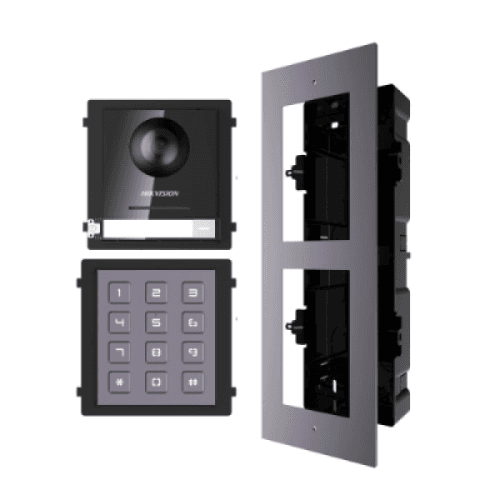
Hikvision 2nd Gen IP Intercom Kit, Door Station, Keypad Module & Flush Gang Box
Model / SKU: HK-INT-GEN2-KIT1
Door station · Intercom kit · IP intercom
$535.00incl. GSTShowroom availability to be confirmedView product ↗ RHODIUMSECURITY Your cart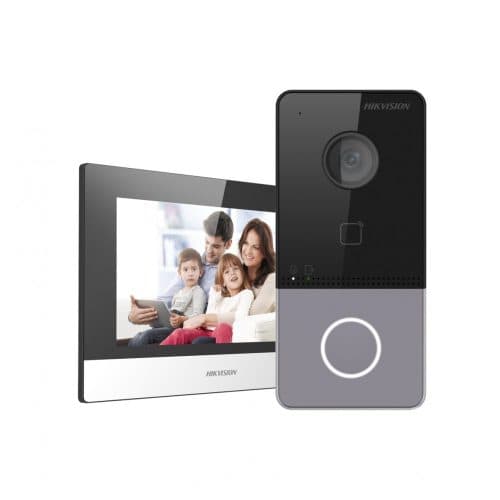
Product image. Check the selected model, lens, colour and package contents before ordering.
Hikvision · Intercoms
Model / SKU: DS-KIS603-P_BUNDLE
Hikvision DS-KIS603-P 2MP Gen2 IP Poe Video Intercom Kit with WiFi Connection & Mobile Viewing. IP Intercom Kit | Wi-Fi Enabled | 7″ Touchscreen | Two-Way Audio | Sleek Gen2 Design | Ideal for Villas & Homes Product Sku: DS-KIS603-P The Hikvision DS-KIS603-P IP Video Intercom Kit is a premium entry solution designed for villas, townhouses, and single-home residences. Combining a stylish Gen2 outdoor door station with a 7” indoor touch monitor, this system enables seamless two-way communication, video verification, and remote access via the Hik-Connect app. Built-in Wi-Fi in both devices allows for simplified installation, eliminating the need for complex cabling while maintaining high-performance security and convenience. Kit Inclusions: 1 x DS-KV6113-WPE1 Gen2 IP Villa Door Station – 1-Button, 2MP Camera, Wi-Fi, PoE, MIFARE 1 x DS-KH6320-WTE1 7″ Indoor Room Station – Touchscreen, Wi-Fi, Hik-Connect Compatible 2 x Power Supply Units Key Features Easy IP Setup with Wi-Fi: Both indoor and outdoor units include Wi-Fi for cable-free installation, allowing faster setup and flexibility in placement. Two-Way Audio & Remote Unlock: Communicate with visitors and unlock your door remotely via the touchscreen or the Hik-Connect app for added convenience and safety. Sleek Modern Design: The Gen2 aesthetic fits stylishly into modern homes while offering robust functionality and high-resolution video communication. Complete Kit for Home Entry: Includes both door station and room monitor with power supplies—perfect for new builds or upgrades to existing systems. Additional Information DS-KIS603-P Datasheet Product Overview The Hikvision DS-KIS603-P is a second-generation IP video intercom kit designed for villas, townhouses, and standalone properties. Featuring a single-button door station (DS-KV6113-WPE1) and a 7-inch touch screen indoor monitor (DS-KH6320-WTE1), this kit offers high-definition video, remote unlocking, and built-in Wi-Fi for seamless connectivity. The system supports standard PoE, making installation simple with minimal cabling. With remote configuration via the Hik-Connect app or client software, this intercom system is perfect for modern homes seeking secure and smart entry management. Package Inclusions DS-KV6113-WPE1 – IP Villa Door Station x 1 DS-KH6320-WTE1 – Indoor Station with 7″ Touchscreen x 1 Power Supply Units x 2 Cabling Requirements: Key Capabilities High-Quality Video Monitoring Equipped with a 2MP HD camera, the door station provides clear visuals even in low light. View live footage or playback events from the indoor station or mobile app. Wi-Fi and PoE Connectivity Both units support Wi-Fi and standard PoE, making installation flexible and reducing the need for complex cabling in modern homes. Remote Unlocking Unlock doors remotely via the mobile app or client software. Ideal for secure delivery access or managing visitors when you’re away. Message and Picture Storage The indoor monitor can store messages and snapshots on a TF card, allowing for offline access to missed calls and door activity. Smart Configuration and Access Control Easily configure devices via web interface. The door station includes tamper protection and supports Mifare card access, enhancing property security. Key Features 2MP HD camera with low illumination performance 7″ touch screen indoor station with 1024 × 600 resolution Standard PoE and Wi-Fi supported for both units Noise suppression and echo cancellation for clear audio Remote unlocking via app or client software Live view of door stations and linked cameras Built-in TF card slot for local storage of messages and images Specifications Summary Camera Resolution: 2MP (Villa Door Station) Indoor Monitor Display: 7″ Touchscreen (1024 × 600) Network: Wi-Fi + PoE Support Storage: TF Card Slot (Indoor Station) Access Control: Mifare Card Support, Remote Unlock Technical Specifications Door Station Model: DS-KV6113-WPE1 Indoor Station Model: DS-KH6320-WTE1 Camera: 2MP CMOS Display: 7” capacitive touchscreen Audio: Two-way audio with noise suppression Connectivity: 10/100 Mbps Ethernet, IEEE802.3af PoE, 2.4GHz Wi-Fi Power Supply: 12V DC or PoE Tamper Protection: Supported (Door Station) Additional Information Setup Video – iVMS & Network Setup https://www.youtube.com/ watch ?v=TNwlhQdSmTY Product Video Samples NOTE: For best quality viewing, change YouTube settings to 2160p resolution using the gear icon. 1. Download & Install HITOOLS DELIVERY / SADP Tool On a Windows PC connected to the same LAN, download SADP Tool from the official Hikvision support site. Install and run the program. It automatically scans and lists all Hikvision devices on your local network. 2. Activate Devices In SADP, select each device (door station and indoor monitor). If status shows “Inactive,” create a strong admin password to activate it. Record both IP addresses and MAC addresses for later use. 3. Set IP Addresses In SADP, assign static IPs within your LAN range (e.g., 192.168.1.100 for the door, 192.168.1.101 for the indoor). Set subnet mask, gateway, and DNS to match your router’s network. Alternatively, leave DHCP on and later reserve IPs in your router (see below). 4. Configure the Door Station Open a web browser and enter the door station’s IP address. Log in with the admin credentials. Go to Network Settings → configure Wi-Fi or wired mode. Set correct time, timezone, and NTP server. Under Intercom → add or link the indoor station by IP address or device number. Adjust door-unlock parameters: relay mode, duration, and NO/NC type. Test by pressing the call button; you should hear a ring at the indoor station. 5. Configure the Indoor Station From the touchscreen, enter Settings → Network and confirm connection (LAN or Wi-Fi). Under Intercom Settings , link the door station using its IP or serial number. Enable Hik-Connect Service: go to Settings → Platform Access , toggle ON, and note the QR code for app binding. Optional: set language, ringtone, volume, date/time, and display preferences. 6. Test Operation Press the doorbell button → indoor monitor should ring and show video. Speak to test two-way audio. Press the unlock icon → electric strike should activate. On mobile, open the Hik-Connect app → scan the indoor station QR code → test live view and unlock. Bind MAC Addresses (Prevent Drop-Offs) 1. Find MAC Addresses SADP shows the MAC for each device in its list. Note these down. 2. Log in to Your Modem/Router Typically at 192.168.0.1 or 192.168.1.1 in your browser. Navigate to LAN → DHCP Reservation or IP/MAC Binding . 3. Reserve Static IPs Add entries for both devices: Example: DS-KV6113-WPE1 → MAC XX:XX:XX:XX:XX:01 → IP 192.168.1.100 DS-KH6320-WTE1 → MAC XX:XX:XX:XX:XX:02 → IP 192.168.1.101 Save and apply settings. 4. Reboot Test Reboot router and both intercom units. Confirm that both reconnect automatically and retain the same IP addresses. Power cycle again to confirm stability. Phase 4 – Final Checks Update firmware to the latest versions. Set both devices to sync with NTP for accurate logs. Configure user cards if using MIFARE reader. Enable event logs and tamper alarms. Back up configuration using the web interface.
incl. GST · Equipment supply
Price checked 6 September 2026Ask about this model at 12 Stelvio Close, Lynbrook VIC 3975. Monday–Friday, 9am–5pm; Saturday 9 am–1 pm; closed Sunday. Online ordering is being prepared. Confirm availability and collection arrangements with the showroom before travelling.
Collection information ↗Equipment supply does not include installation unless expressly included in your confirmed quote. Check compatibility with existing cameras, recorders and cabling before buying. Kit storage and additional equipment depend on the selected options.
Compare the listed model, lens and equipment options with the area you need to see. For an upgrade, have your current recorder model ready so compatibility can be checked. Equipment prices are separate from installation unless your quote says otherwise.
Model / SKU: HK-INT-GEN2-KIT1
Door station · Intercom kit · IP intercom
$535.00incl. GSTShowroom availability to be confirmedView product ↗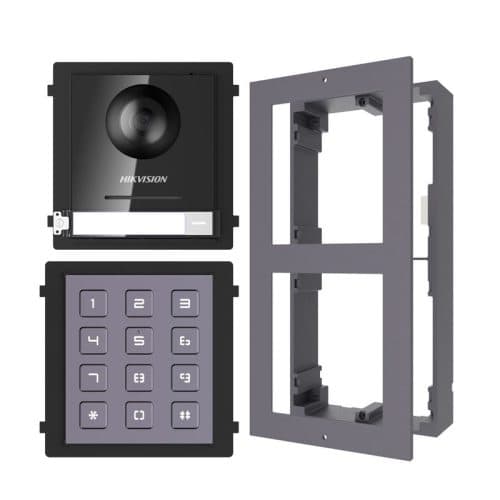
Model / SKU: HK-INT-GEN2-KIT2
Door station · Intercom kit · IP intercom
$418.00incl. GSTShowroom availability to be confirmedView product ↗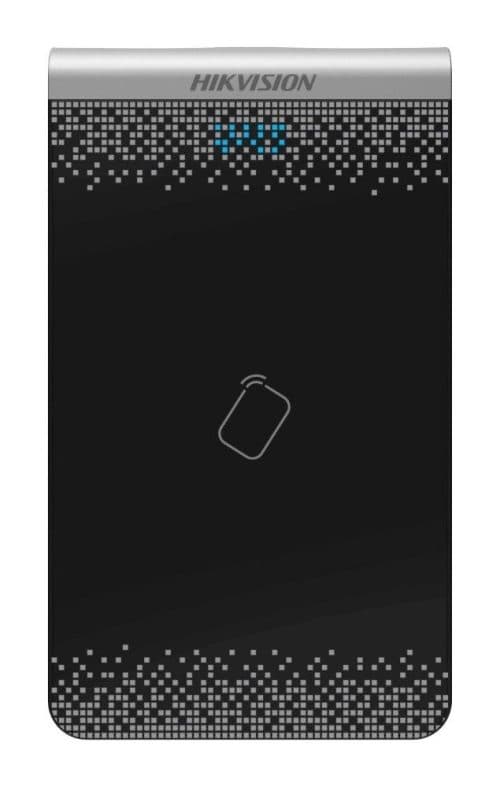
Model / SKU: DS-K1F100-D8E
Video intercom · Entry access control
$133.00incl. GSTShowroom availability to be confirmedView product ↗