Hikvision · Intercoms
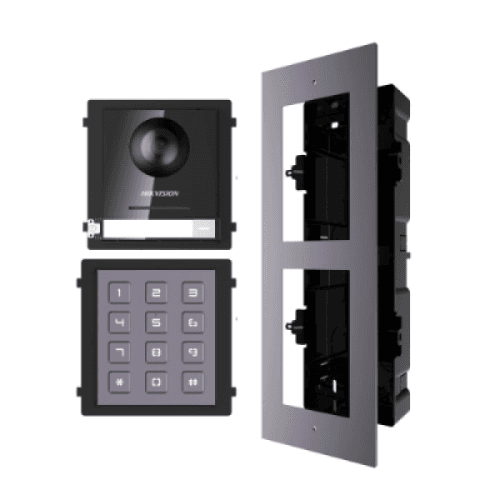
Hikvision 2nd Gen IP Intercom Kit, Door Station, Keypad Module & Flush Gang Box
Model / SKU: HK-INT-GEN2-KIT1
Door station · Intercom kit · IP intercom
$535.00incl. GSTShowroom availability to be confirmedView product ↗ RHODIUMSECURITY Your cart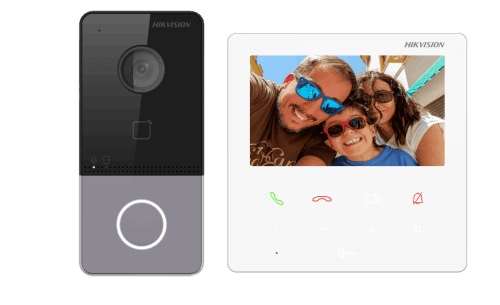
Product image. Check the selected model, lens, colour and package contents before ordering.
Hikvision · Intercoms
Model / SKU: DS-KIS606-P
Hikvision DS-KIS606-P 2MP IP Video Intercom Kit (Villa Package). Complete IP video intercom kit designed for villa or single-family entrance control: 2 MP door station, 4.3″ indoor monitor, call button panel, power supplies, on-app control and IP65 outdoor rating. Indoor monitor link (you can add extra monitors) – https://www.securitywholesalers.com.au/product/hikvision-ds-kh6110-we1-white-4-3%e2%80%b3-ip-indoor-station-with-wi-fi-poe/ DS-KIS606-P_Datasheet The Hikvision DS-KIS606-P is a complete IP intercom bundle ideal for residential homes, small offices, or single-entry properties. It combines a 2 MP outdoor door station with a 4.3″ indoor monitor , offering high-definition video, crystal-clear audio, and mobile app access through Hik-Connect. The door station captures a wide 131° field of view with 120 dB WDR, ensuring clear images even under bright backlight or shadows. Built-in IR illumination provides night-time visibility up to approximately 3 metres. The rugged IP65 housing is fully weather-sealed for reliable outdoor performance. The indoor monitor offers intuitive control via a capacitive 4.3″ touch screen, supporting live view, visitor intercom, remote door unlocking, and system configuration. Up to 2,000 users and 10,000 access cards can be stored on the system, making it scalable for small apartment or multi-dwelling setups. It also supports up to 16 indoor extensions , allowing multi-room connectivity. The kit supports Hik-Connect app integration , enabling push notifications and remote two-way communication when visitors press the call button. Everything required for setup is included in the box: the door station, indoor station, power supplies, and accessories. Key Features 2 MP (1920 × 1080) HD video door station Wide 131° horizontal field of view 120 dB WDR and IR illumination up to ~3 m Two-way audio with noise suppression and echo cancellation IP65 outdoor protection for door station 4.3″ touch-screen indoor monitor Supports up to 2,000 users and 10,000 card IDs Up to 16 linked indoor monitors Includes two power supplies in the kit Mobile app integration via Hik-Connect Relay output for electric strike or gate control Operating temperature: -40 °C to +55 °C USEFUL VIDEOS Specifications Table Attribute Specification Model Number DS-KIS606-P Camera (Door Station) 2 MP (1920 × 1080) Field of View (H/V) 131° / 78° IR Range Up to 3 m WDR 120 dB Display (Indoor) 4.3″ capacitive touch screen User Capacity 2,000 users Card Capacity 10,000 cards Linked Indoor Stations Up to 16 Protection Rating IP65 (door station) Power Supply 12 V DC or PoE (IEEE 802.3af) Power Consumption < 10 W Operating Temperature –40 °C ~ +55 °C Installation Instructions (Step-by-Step) 1. Pre-Install Setup Plan cable runs for both door station and indoor monitor . Use Cat6 network cable for both video and power transmission (PoE). Confirm location of the main network point and ensure it is within 100 m of the door station. 2. Mounting the Door Station Mount height should be 1.4–1.6 m from ground to capture accurate facial images. Use supplied backplate and ensure mounting surface is flat. Feed Cat6 cable through waterproof gland. Connect Ethernet (PoE) and any optional lock control wires (NO/NC relay). Seal cable entry and wall junction with silicone to maintain IP65 weatherproof rating . 3. Installing the Indoor Monitor Mount the 4.3″ screen at an accessible height (~1.4 m). Connect the indoor monitor via Cat6 cable to the same network or PoE switch. Power either via 12 V DC (included adapter) or PoE port . 4. Network Setup Connect both devices to your LAN (router or switch). Use a PC with SADP Tool to find and activate devices. Set static IP addresses in the same subnet. Link indoor and outdoor stations via iVMS-4200 or directly through the indoor monitor UI . 5. Hik-Connect App Setup Add the indoor monitor to the Hik-Connect app using the QR code displayed on screen. Test video call, unlock relay, and push notifications. 6. Final Testing Check video clarity (day/night). Test call function, unlock relay, and tamper alarm. Verify network connectivity remains stable for at least 24 hours before commissioning. Installer Notes Keep PoE cable runs under 100 m. Always seal outdoor cable entry points and avoid facing direct rain or sunlight. Do not share power supplies between intercom and heavy-load PoE cameras. Perform firmware updates during setup to ensure latest compatibility. Change all default passwords before handover.
incl. GST · Equipment supply
Price checked 6 September 2026Ask about this model at 12 Stelvio Close, Lynbrook VIC 3975. Monday–Friday, 9am–5pm; Saturday 9 am–1 pm; closed Sunday. Online ordering is being prepared. Confirm availability and collection arrangements with the showroom before travelling.
Collection information ↗Equipment supply does not include installation unless expressly included in your confirmed quote. Check compatibility with existing cameras, recorders and cabling before buying. Kit storage and additional equipment depend on the selected options.
Compare the listed model, lens and equipment options with the area you need to see. For an upgrade, have your current recorder model ready so compatibility can be checked. Equipment prices are separate from installation unless your quote says otherwise.
Model / SKU: HK-INT-GEN2-KIT1
Door station · Intercom kit · IP intercom
$535.00incl. GSTShowroom availability to be confirmedView product ↗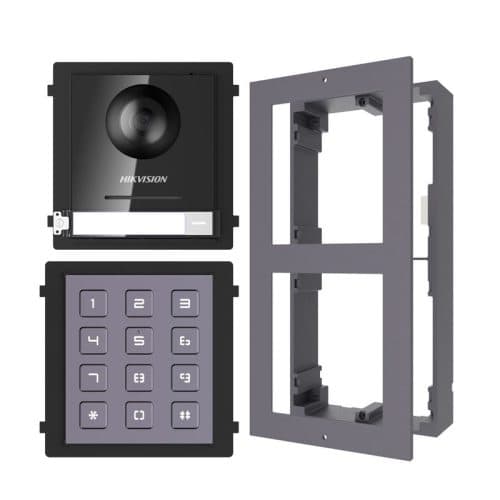
Model / SKU: HK-INT-GEN2-KIT2
Door station · Intercom kit · IP intercom
$418.00incl. GSTShowroom availability to be confirmedView product ↗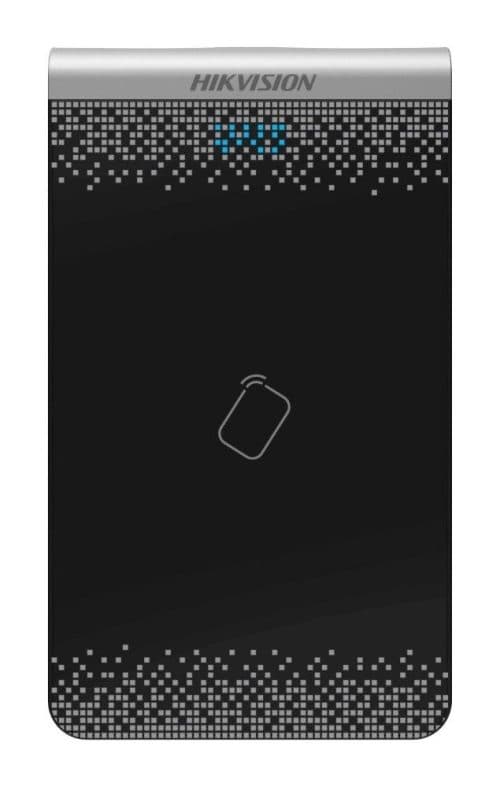
Model / SKU: DS-K1F100-D8E
Video intercom · Entry access control
$133.00incl. GSTShowroom availability to be confirmedView product ↗