Hikvision · Alarms
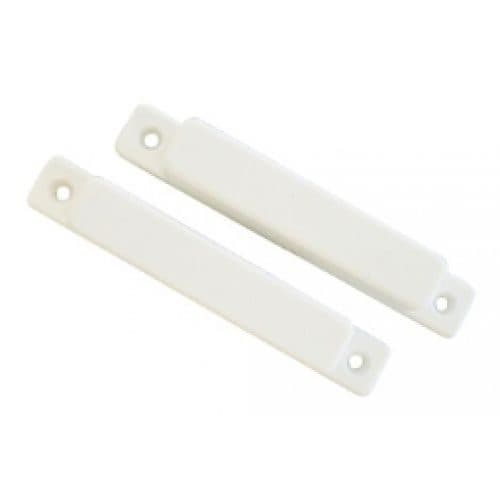
Big Gap Surface Mount Reed Switch, White
Model / SKU: CSD-2001
Alarm accessory
$15.00incl. GSTShowroom availability to be confirmedView product ↗ RHODIUMSECURITY Your cart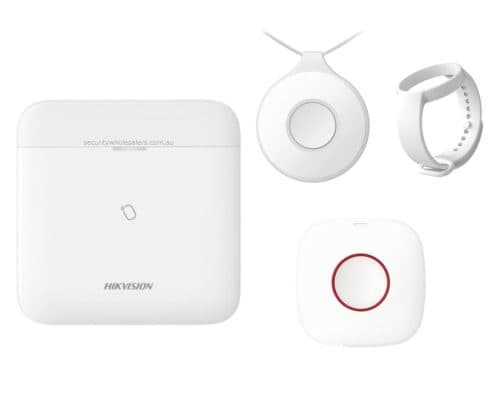
Product image. Check the selected model, lens, colour and package contents before ordering.
Hikvision · Alarms
Model / SKU: DS-PWA64-DURESSKIT-SILENT
Hikvision AX PRO Duress Silent Alarm Security Kit – Control Panel, Panic Buttons. AX PRO Duress Kit could be ideal for: Elderly living alone Families with less abled people Victims of domestic violence to notify others that they are in duress Commercial premises likely to experience duress situations When the duress button is pressed, it will send a signal to the Hikvision AX Pro Panel, which will then either via sim card or internet, make a phone call or push notification on others set up on the system. Comprises of: Hikvision DS-PWA64-M-WB Alarm Panel x 1 Hikvision AX PRO DS-PDB-IN-Wristband Wristband accessory for Panic Button Hikvision AX PRO DS-PDEBP1-EG2-WB Portable Wireless Emergency Button x 1 Hikvision AX PRO Series DS-PDEB1-EG2-WB Wall-mounted Wireless Emergency Button x 1 SPEC Sheet DS-PWA-AXPRO AX PRO is both conventional and revolutionary, with proven wireless stability, a wide range of world-class products, and ease-of-use for both installers and end users. Simple setup, powerful protection – whether it’s for a business-owner’s property or a home-owner’s loved ones – bringing peace of mind every day, all day. This is basically a wireless duress / panic alarm system built around the Hikvision AX PRO alarm panel. When someone presses one of the panic buttons, it sends a wireless signal back to the AX PRO control panel. The panel then sends an alert out through the internet, Wi-Fi, or optional SIM/3G/4G connection, depending on how it is set up. The alert can go to nominated users as a phone call, app push notification, or message . The kit includes: Part What it does AX PRO control panel The main brain of the system. It receives the panic signal and sends alerts out. Portable wireless emergency button A small panic button that can be carried around. Wristband accessory Lets the portable panic button be worn on the wrist. Wall-mounted wireless emergency button A fixed panic button for a bedroom, counter, office, reception area, etc. In real life, it would work like this: The AX PRO panel is installed and connected to the internet, Wi-Fi, and/or SIM backup. The panic buttons are paired to the panel. Users are added in the Hik-Connect app. When the user presses the panic button, the panel receives the duress alarm. The system silently notifies the nominated people. Those people can then respond, call the person, check on them, or escalate to emergency services. The “silent” part means it is intended to notify others without necessarily setting off a loud siren at the premises. That makes it suitable for duress situations where the person may not want to alert someone nearby that an alarm has been triggered. It is mainly aimed at situations such as elderly people living alone, people with limited mobility, domestic violence risk, or commercial premises where staff may face duress situations. Demo of how the system works Unboxing and configuration video – Check it out before attempting to do it yourself TCP/IP, Wi-Fi, and 3/4G network New generation wireless protocol: Tri-X/Cam-X Long RF transmission distance Two-way communication with AES-128 encryption Connects up to 96 wireless zones/outputs (including 48 PIRCAMs), 48 wireless keyfobs, 4 repeaters, 6 sounders, 8 tag readers & keypads. Supports up to 48 network users, including 1 installer, 1 administrator, and 46 normal users Voice prompt Configuration via Web client, mobile client, and Convergence Cloud Hik-Connect and Hik-ProConnect configuration depends on the user access level Pushes alarm notification via messages or phone calls Views live videos from Hik-Connect Alarm video clips via emails and APP Supports LED indicator to indicates system status 4520 mAh lithium backup battery SIA-DC09 protocol, and supports both Contact ID and SIA data format Supports Hik-IP Receiver and Hik-IP Receiver Pro for ARC communication Software Features Tag 32 Area 16 Zones 64 (up to 48 PIRCAMs) Installer 1 User 30 Admin 1 Voice Prompt Supported Loudspeaker Built In Supported Memory Log Stored 5000 Programming Tools Hik-Connect/Hik-ProConnect/Web Portal/ IVMS4200/ Convergence Cloud Firmware Upgrade APP/Web Portal Arm Modes Away/Stay Automatic Arm/Disarm Timers Supported Forced Arming With Open Zones Supported Diagnostics Via The APP Or Web Supported ARC Protocol SIA DC09(SIA level 2, Contact ID), ISUP, ISAPI (SDK) Hik-IP Receiver & Hik-IP Receiver Pro (Sur-Gard & Ademco 685) Supports video verification and remote control User APP For Operating Supported Installer APP For Programming Supported Web Server For Maintenance (Offline Configuration) Supported Hardware Features RS232 Output Supported SIM Slot Single RF Transmission RF Frequency 433Mhz Wireless Security Frequency Hoping 128 AES Encryption GPRS On Board Supported Electrical Characteristics Power Supply Built in power supply Battery Type Built in on board Battery Li Battery Life Span 12 hours Wireless Transmission Wired Network Supported Wi-Fi Standard Supported Display LEDs Status Arm/Disarm, Alarm, Tamper, Fault, Cloud, Power General Operation Temperature -10 °C to +55 °C Shell Material Plastic Dimension(WxHxD) 170.0 mm (6.7″) x 170.0 (6.7″) mm x 38.6 mm (1.5″) 557.5 g(19.7 oz) Color White Device Management Keyfob 32 Wireless Sounder 4 Keypad 8 (Including Tag reader) Wireless Repeater 2 PIR Cam Supported
incl. GST · Equipment supply
Price checked 6 September 2026Ask about this model at 12 Stelvio Close, Lynbrook VIC 3975. Monday–Friday, 9am–5pm; Saturday 9 am–1 pm; closed Sunday. Online ordering is being prepared. Confirm availability and collection arrangements with the showroom before travelling.
Collection information ↗Equipment supply does not include installation unless expressly included in your confirmed quote. Check compatibility with existing cameras, recorders and cabling before buying. Kit storage and additional equipment depend on the selected options.
Compare the listed model, lens and equipment options with the area you need to see. For an upgrade, have your current recorder model ready so compatibility can be checked. Equipment prices are separate from installation unless your quote says otherwise.
Model / SKU: CSD-2001
Alarm accessory
$15.00incl. GSTShowroom availability to be confirmedView product ↗
Model / SKU: DS-PDSKM-VG3
Sensor
$86.00incl. GSTShowroom availability to be confirmedView product ↗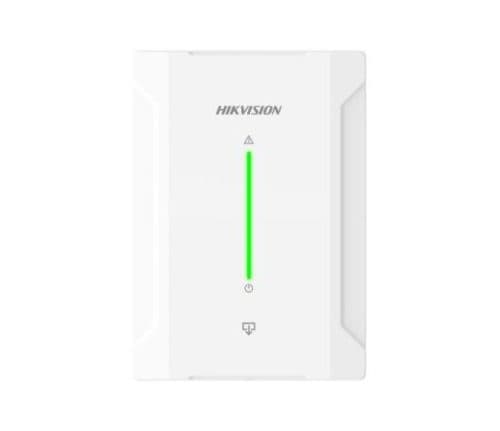
Model / SKU: DS-PM1-O4L-H
Alarm accessory
$91.11incl. GSTShowroom availability to be confirmedView product ↗